There are two OpenClaw hosting options and they are Self-managed OpenClaw hosting and Managed OpenClaw hosting
In self-managed OpenClaw hosting, you will get the server resources and you need to manage the entire thing manually through the CLI or any other available methods. Managed OpenClaw hosting is for non-technical users, where the hosting company itself manages the OpenClaw setup, backups, security and everything else. You just need to log in and use OpenClaw.
There are 70+ services offering both self-managed and managed OpenClaw hosting. We found that at least 15 to 20 hosting services have gone out of business because the tool was vibe-coded quickly but never attracted customers.
After going through all the research, I created a new methodology to find the best OpenClaw hosting services. I have considered the following things:
Security · 25% · Dedicated VM or hardened container, authenticated gateway, firewall
Provider durability · 15% · Years trading, named legal entity, parent backing, customer evidence
Backups · 15% · Automatic backups included, one-click restore, downloadable export
Price · 15% · Advertised monthly price of the plan scored, on the log scale below
Management · 10% · Provider applies OS and OpenClaw updates, monitors and repairs
Reliability · 10% · Always-on design, health checks, auto-restart, status transparency
Resources · 5% · vCPU, RAM and storage against the 2 vCPU and 4 GB floor
Integrations · 5% · BYOK or multiple models, messaging channels, browser, terminal
Overall Best OpenClaw Hosting – Cloudways
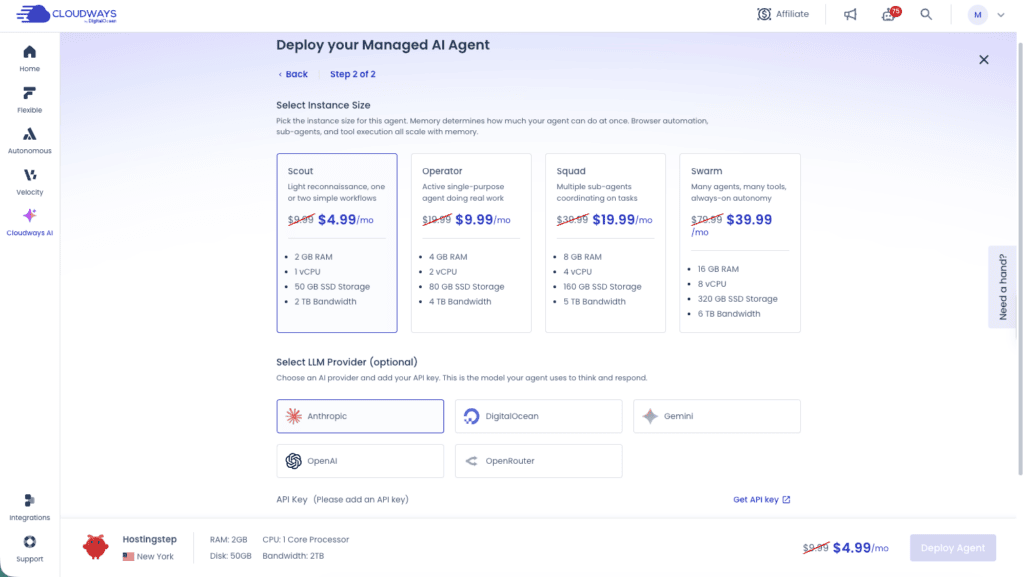
Cloudways is the best OpenClaw hosting as of September 2026. Cloudways is not the first hosting company to launch OpenClaw hosting, but they took time, and I think they have somehow launched the very best managed hosting for OpenClaw. It ticks all the boxes for managed hosting where it’s pre-configured for security, automated backups with 1-click restore and access to the OpenClaw dashboard. You can currently chat via WhatsApp and Slack. Your OpenClaw data is completely private in an isolated environment, which is separate from other customers’ environments. For example, a Cloudways customer support team can access the infrastructure level and your server for diagnostic purposes, but the data inside the agent’s memory, your conversations remains private, between you and your agent. There is no fixed cost requirement for the API keys to run with OpenClaw. You can bring your own keys and run it as needed.
The major issue with the self-managed OpenClaw hosting is that whenever OpenClaw releases an update, the agent might break and stop running its regular tasks. However, at Cloudways, each of the updates from OpenClaw is tested to see whether it breaks anything, and only if the testing process passes, the update is pushed to users.
Best Managed OpenClaw hosting – Hostinger
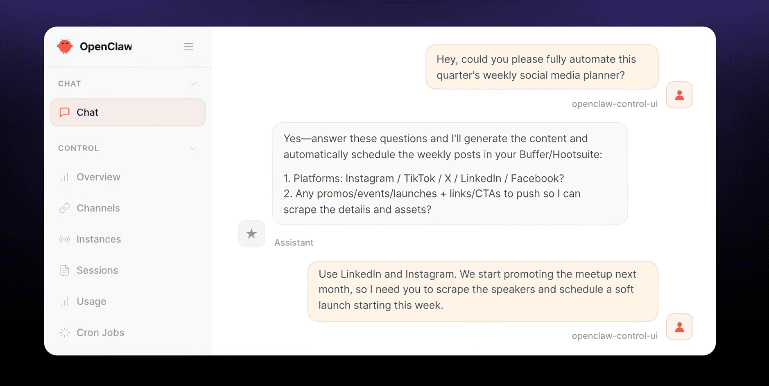
Hostinger was one of the first companies to launch OpenClaw. Unlike Cloudways, which offers different plans based on the CPU and RAM, Hostinger offers a single plan that comes ready to use from day one. It provides all the managed features of security, backups and zero configuration. The major highlight of Hostinger is that AI credits are included, and you can also use your own ChatGPT account and connect it to Hostinger OpenClaw. So this eliminates the need to buy the AI credits separately. Another feature you can get exclusively with Hostinger is a pre-configured agentic email. It offers a dedicated email inbox for OpenClaw so you can keep your personal email separate.
Multi-Region OpenClaw Hosting – xCloud
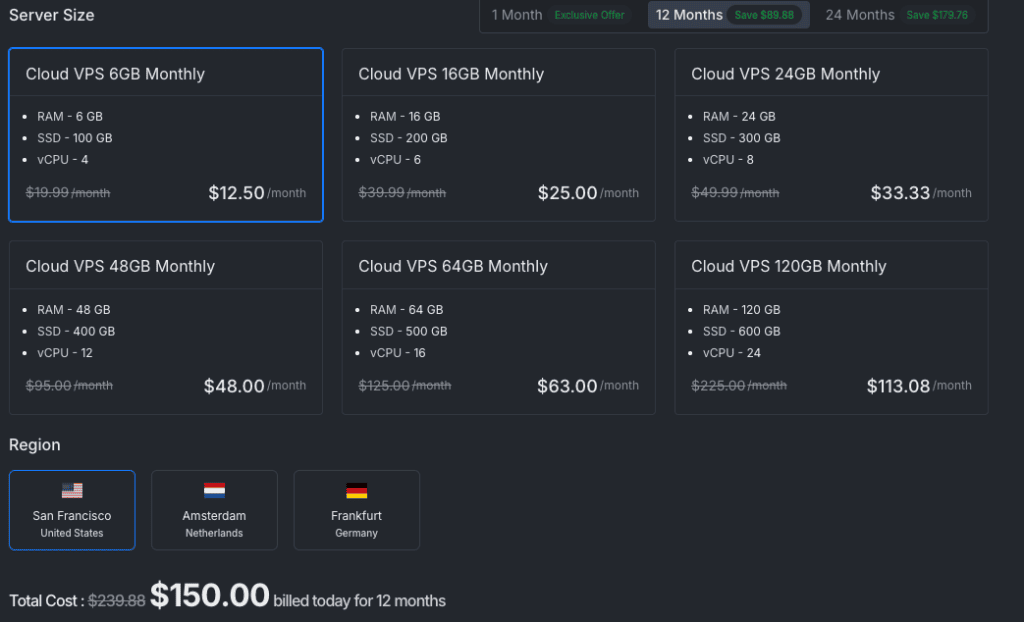
xCloud is another strong OpenClaw host, which has secured third position based on our methodology. If you are limited to running your assistant only on WhatsApp, Telegram and Slack, then xCloud will help you run it on more services like Discord. Just like Hostinger and Cloudways, it handles security and updates, and no technical skills are required to run the tool. The plan starts at $9.99 per month. However, it renews at $19.99 per month, which makes the plan quite expensive when compared with Hostinger and Cloudways. Another advantage of xCloud is that you can install OpenClaw in any of its 30 global locations, so accessing and retrieving data is faster from your location. The sales page mentions 30 global locations to deploy the AI agent but on the cart page, only three locations are available.
Methodology: Security 25% · Provider durability 15% · Backups 15% · Price 15% · Management 10% · Reliability 10% · Resources 5% · Integrations 5% | Verified: September 9, 2026 · 28 providers ranked from 33 audited
Managed OpenClaw Hosting
We audited 33 OpenClaw hosting providers against their own product pages on September 9, 2026, recording isolation model, backup policy, update ownership, legal entity and published pricing for every one. In managed hosting the provider carries the infrastructure, the OpenClaw updates and the security posture. The price shown is the plan each provider advertises on its own OpenClaw page.
| Rank | Provider | Plan specs | Price | Security 25% | Durability 15% |
Backups 15% | Price 15% | Final score |
|---|---|---|---|---|---|---|---|---|
| 1 |  CloudwaysManaged AI Agents · Scout CloudwaysManaged AI Agents · Scout |
1 vCPU / 2 GB / 50 GB | $4.99$9.99 list, hourly | 8.50 | 9.50 | 8.50 | 10.00 | 8.58 |
| 2 |  Hostinger1-click Managed OpenClaw Hostinger1-click Managed OpenClaw |
Specs not published | $5.99$11.99, 24-mo upfront | 7.50 | 9.80 | 7.00 | 9.40 | 8.26 |
| 3 | xCloudManaged OpenClaw · Cloud VPS 6GB | 4 vCPU / 6 GB / 100 GB | $9.99$19.99 | 8.00 | 6.50 | 8.50 | 7.60 | 7.92 |
| 4 | HostMeNowManaged OpenClaw | 2 CPU / 4 GB / 80 GB | $10.00Monthly | 7.00 | 6.00 | 7.00 | 7.60 | 6.94 |
| 5 | Agent37Managed OpenClaw · Basic | 1 vCPU / 4 GB / 8 GB | $3.99Monthly | 7.00 | 4.50 | 3.50 | 10.00 | 6.65 |
| 6 | SetupOpenClawOpenClaw Cloud · Starter | 2 CPU / 4 GB / 40 GB | $19.00Monthly · waitlist | 8.00 | 2.00 | 8.50 | 5.40 | 6.63 |
| 7 | TryOpenClawOpenClaw Cloud · Starter | 2 vCPU / 4 GB / 5 GB | $4.00$9 after launch offer | 6.50 | 5.00 | 4.00 | 10.00 | 6.60 |
| 8 | MyClawManaged OpenClaw · Lite | 2 vCPU / 4 GB / 40 GB | $19.00$29 monthly / $199 yr | 6.50 | 3.50 | 7.00 | 5.40 | 6.29 |
| 9 | BearHostManaged OpenClaw · Cub | Specs not published | $18.99£14.15 monthly | 8.00 | 1.50 | 8.00 | 5.40 | 6.24 |
| 10 | ClawHostersManaged OpenClaw · Budget | 2 vCPU / 4 GB / 40 GB | $22.00€19 monthly | 7.50 | 2.50 | 4.00 | 4.90 | 5.79 |
| 11 | OneClawManaged OpenClaw | Specs not published | $9.99Monthly | 6.00 | 2.00 | 5.00 | 7.60 | 5.71 |
| 12 | ClawCloudManaged OpenClaw · Lite | 2 vCPU / 2 GB / 60 GB | $29.00Linux monthly | 6.50 | 2.50 | 5.00 | 3.90 | 5.36 |
| 13 | OpenClaw LaunchManaged OpenClaw · Lite | 1 vCPU / 2 GB / 10 GB | $3.00$6 after month 1 | 4.50 | 2.20 | 4.00 | 10.00 | 5.21 |
| 14 | ClawNestManaged OpenClaw · Basic | 2 GB / 10 GB | $49.00Monthly | 6.50 | 2.00 | 4.00 | 2.10 | 4.84 |
| Not ranked. No measurable branded search demand, so long-term viability cannot be assessed. | ||||||||
| – | VibeOpenClawManaged OpenClaw · Pro | Specs not published | $24.00Monthly | Docker isolation, BYOK, AES-256 key storage. No backup statement and no company disclosure. | Unverified | |||
Self-Managed OpenClaw Hosting
In self-managed hosting the provider supplies the server and a deployment path, and you own the OpenClaw updates, the hardening and the recovery. We score every host on the cheapest plan that clears OpenClaw’s documented 2 vCPU and 4 GB floor. Seven of these providers advertise a cheaper plan that falls below that floor, and each one is named in the Evidence tab with its price.
| Rank | Provider | Plan specs | Install | Price | Security 25% | Durability 15% |
Backups 15% | Price 15% | Final score |
|---|---|---|---|---|---|---|---|---|---|
| 1 | HostingerOpenClaw VPS · KVM 2 |
2 vCPU / 8 GB / 100 GB NVMe | One-click | $8.99$14.99, 24-mo upfront | 7.50 | 9.80 | 7.00 | 8.00 | 7.92 |
| 2 | OVHcloudVPS OpenClaw · 2027 VPS-2 | 4 vCore / 8 GB / 75 GB NVMe | Guided | $8.5012-mo upfront | 7.00 | 9.50 | 8.00 | 8.20 | 7.85 |
| 3 |  GoDaddyOpenClaw VPS · Starter GoDaddyOpenClaw VPS · Starter |
2 vCPU / 4 GB / 100 GB NVMe | One-click | $8.99$32.99 list, 1-yr | 7.00 | 9.80 | 8.00 | 8.00 | 7.84 |
| 4 |  IONOSVPS+ OpenClaw · VPS M+ IONOSVPS+ OpenClaw · VPS M+ |
2 vCore / 4 GB / 120 GB NVMe | One-click | $4.00$11 after 3 months | 6.50 | 9.80 | 5.00 | 10.00 | 7.62 |
| 5 | ContaboOpenClaw VPS · Cloud VPS 10 | 4 vCPU / 8 GB / 75 GB NVMe | One-click | $4.9512-mo; setup fee monthly | 6.50 | 9.00 | 5.50 | 10.00 | 7.45 |
| 6 | RailwayOpenClaw template | Usage-based · ~2 GB | Template | $5.00Hobby base, usage-billed | 6.50 | 7.00 | 6.00 | 10.00 | 7.32 |
| 7 | NorthflankOpenClaw stack template | Usage-based · ~2 GB | Template | $5.00Usage-billed | 6.50 | 6.80 | 6.00 | 10.00 | 7.29 |
| 8 | HostGatorOpenClaw VPS · NVMe 4 | 2 vCPU / 4 GB / 100 GB NVMe | One-click | $4.18$9.35, 24-mo | 6.00 | 9.20 | 5.00 | 10.00 | 7.18 |
| 9 | DigitalOceanOpenClaw 1-Click · s-2vcpu-4gb | 2 vCPU / 4 GB / 80 GB SSD | One-click | $24.00Usage, no term | 7.50 | 9.20 | 6.00 | 4.60 | 7.07 |
| 10 | SSD NodesOpenClaw VPS · KVM Small | 2 vCPU / 8 GB / 160 GB SSD | Manual | $5.503-yr prepay (~$17 monthly) | 6.50 | 7.20 | 5.00 | 9.70 | 7.04 |
| 11 | KamateraOpenClaw VPS · custom | 2 vCPU / 4 GB / 50 GB SSD | Manual | $15.00Hourly, no term | 7.00 | 8.80 | 6.00 | 6.20 | 6.98 |
| 12 |  BluehostOpenClaw VPS · NVMe 4 BluehostOpenClaw VPS · NVMe 4 |
2 vCPU / 4 GB / 100 GB NVMe | One-click | $9.99Monthly, no upfront | 6.00 | 9.20 | 5.00 | 7.60 | 6.82 |
| 13 | LumaDockOpenClaw VPS · EPYC P1 | 2 vCPU / 4 GB / 40 GB NVMe | Auto-install | $6.99$8.99 monthly | 6.50 | 5.00 | 7.00 | 8.80 | 6.80 |
| 14 | RenderOpenClaw Blueprint · Pro | 4 GB instance + disk | Blueprint | $85.00Usage, no term | 7.00 | 7.50 | 6.00 | 2.00 | 6.30 |
| Not ranked. Listed in the official OpenClaw install docs, but VPS pricing is not published, so the price and resource factors cannot be scored. | |||||||||
| – | exe.devOpenClaw on exe.dev VM | Not published | One-click | –Not published | Official docs.openclaw.ai install path with agent-assisted setup and HTTPS proxy. | Provisional | |||
Managed hosting: all eight factors
Every factor behind the final score, with the exact plan each score was taken from. No factor is hidden and no score is rounded in our favour.
| Provider | Plan scored | Security 25% | Durability 15% | Backups 15% | Price 15% |
Management 10% | Reliability 10% | Resources 5% | Integrations 5% |
Final |
|---|---|---|---|---|---|---|---|---|---|---|
| Cloudways | 1 vCPU / 2 GB / 50 GB | 8.50 | 9.50 | 8.50 | 10.00 | 9.00 | 8.00 | 3.50 | 7.50 | 8.58 |
| Hostinger | Specs not published | 7.50 | 9.80 | 7.00 | 9.40 | 9.00 | 8.00 | 6.50 | 8.50 | 8.26 |
| xCloud | 4 vCPU / 6 GB / 100 GB | 8.00 | 6.50 | 8.50 | 7.60 | 9.00 | 8.00 | 9.00 | 7.50 | 7.92 |
| HostMeNow | 2 CPU / 4 GB / 80 GB | 7.00 | 6.00 | 7.00 | 7.60 | 7.50 | 6.00 | 7.00 | 8.00 | 6.94 |
| Agent37 | 1 vCPU / 4 GB / 8 GB | 7.00 | 4.50 | 3.50 | 10.00 | 8.00 | 7.50 | 4.00 | 9.00 | 6.65 |
| SetupOpenClaw | 2 CPU / 4 GB / 40 GB | 8.00 | 2.00 | 8.50 | 5.40 | 8.50 | 6.50 | 6.50 | 8.50 | 6.63 |
| TryOpenClaw | 2 vCPU / 4 GB / 5 GB | 6.50 | 5.00 | 4.00 | 10.00 | 7.50 | 7.00 | 6.00 | 7.50 | 6.60 |
| MyClaw | 2 vCPU / 4 GB / 40 GB | 6.50 | 3.50 | 7.00 | 5.40 | 8.00 | 7.00 | 6.50 | 9.00 | 6.29 |
| BearHost | Specs not published | 8.00 | 1.50 | 8.00 | 5.40 | 7.00 | 6.00 | 5.00 | 9.00 | 6.24 |
| ClawHosters | 2 vCPU / 4 GB / 40 GB | 7.50 | 2.50 | 4.00 | 4.90 | 8.00 | 6.50 | 6.50 | 8.50 | 5.79 |
| OneClaw | Specs not published | 6.00 | 2.00 | 5.00 | 7.60 | 7.50 | 6.50 | 5.00 | 7.50 | 5.71 |
| ClawCloud | 2 vCPU / 2 GB / 60 GB | 6.50 | 2.50 | 5.00 | 3.90 | 8.00 | 7.00 | 3.50 | 7.00 | 5.36 |
| OpenClaw Launch | 1 vCPU / 2 GB / 10 GB | 4.50 | 2.20 | 4.00 | 10.00 | 7.00 | 5.00 | 3.00 | 6.00 | 5.21 |
| ClawNest | 2 GB / 10 GB | 6.50 | 2.00 | 4.00 | 2.10 | 8.00 | 6.50 | 3.00 | 8.00 | 4.84 |
Self-managed hosting: all eight factors
| Provider | Plan scored | Security 25% | Durability 15% | Backups 15% | Price 15% |
Management 10% | Reliability 10% | Resources 5% | Integrations 5% |
Final |
|---|---|---|---|---|---|---|---|---|---|---|
| Hostinger | 2 vCPU / 8 GB / 100 GB NVMe | 7.50 | 9.80 | 7.00 | 8.00 | 6.50 | 8.00 | 8.50 | 9.00 | 7.92 |
| OVHcloud | 4 vCore / 8 GB / 75 GB NVMe | 7.00 | 9.50 | 8.00 | 8.20 | 5.50 | 8.50 | 9.00 | 8.00 | 7.85 |
| GoDaddy | 2 vCPU / 4 GB / 100 GB NVMe | 7.00 | 9.80 | 8.00 | 8.00 | 6.50 | 8.00 | 7.00 | 8.50 | 7.84 |
| IONOS | 2 vCore / 4 GB / 120 GB NVMe | 6.50 | 9.80 | 5.00 | 10.00 | 6.50 | 8.50 | 7.50 | 8.00 | 7.62 |
| Contabo | 4 vCPU / 8 GB / 75 GB NVMe | 6.50 | 9.00 | 5.50 | 10.00 | 6.00 | 7.00 | 9.00 | 8.00 | 7.45 |
| Railway | Usage-based · ~2 GB | 6.50 | 7.00 | 6.00 | 10.00 | 7.00 | 8.00 | 6.00 | 9.00 | 7.32 |
| Northflank | Usage-based · ~2 GB | 6.50 | 6.80 | 6.00 | 10.00 | 7.50 | 7.50 | 6.00 | 9.00 | 7.29 |
| HostGator | 2 vCPU / 4 GB / 100 GB NVMe | 6.00 | 9.20 | 5.00 | 10.00 | 6.00 | 7.00 | 7.00 | 8.00 | 7.18 |
| DigitalOcean | 2 vCPU / 4 GB / 80 GB SSD | 7.50 | 9.20 | 6.00 | 4.60 | 5.50 | 9.00 | 6.50 | 9.00 | 7.07 |
| SSD Nodes | 2 vCPU / 8 GB / 160 GB SSD | 6.50 | 7.20 | 5.00 | 9.70 | 6.00 | 7.00 | 8.50 | 8.00 | 7.04 |
| Kamatera | 2 vCPU / 4 GB / 50 GB SSD | 7.00 | 8.80 | 6.00 | 6.20 | 5.50 | 8.00 | 6.50 | 8.00 | 6.98 |
| Bluehost | 2 vCPU / 4 GB / 100 GB NVMe | 6.00 | 9.20 | 5.00 | 7.60 | 6.00 | 7.00 | 7.00 | 8.00 | 6.82 |
| LumaDock | 2 vCPU / 4 GB / 40 GB NVMe | 6.50 | 5.00 | 7.00 | 8.80 | 6.00 | 7.50 | 6.00 | 8.00 | 6.80 |
| Render | 4 GB instance + disk | 7.00 | 7.50 | 6.00 | 2.00 | 6.50 | 8.00 | 6.50 | 9.00 | 6.30 |
Managed hosting: what each provider publishes
Every cell records what the provider publishes on its own pages, checked on September 9, 2026. Where a page is silent we record “not stated” rather than infer a feature, so each score in the Score Breakdown tab traces back to a published statement.
| Provider | Isolation model | Backups | OpenClaw updates | Company | Branded searches/mo |
|---|---|---|---|---|---|
| Cloudways | Dedicated instance per customer | Automated daily, one-click restore, 14-day retention | Provider, validated releases | Cloudways, LLC (DigitalOcean) · 2012 · US | 74,000Established |
| Hostinger | Isolated container, generated security gateway | Managed by provider | Provider, latest stable | Hostinger International · 2004 · LT | 4,090,000Established |
| xCloud | Dedicated fully managed VM | Daily encrypted, one-click restore | Provider, automatic | xCloud Hosting LLC (WPDeveloper) · 2024 · US | 880Newer |
| HostMeNow | Containerised environment | Daily, included | Provider | HostMeNow Ltd · inc. 2019 · UK | 590Newer |
| Agent37 | Isolated container per instance | Not stated; file browser export | Provider | Agent 37 (Y Combinator) · 2025 · US · SOC 2 Type I | 1,600Newer |
| SetupOpenClaw | Dedicated server (Hetzner DE) | Daily encrypted, dashboard restore | Provider, automatic | Not published · billing via Polar | 10Unverified |
| TryOpenClaw | Private isolated environment | Not stated | Provider, auto-update | FireApps Technology JSC · reg. 2018 · VN | 140Newer |
| MyClaw | Isolated private instance | Daily, included | Provider, automatic | Cubo World Inc. · 2026 · SG | 6,600Newer |
| BearHost | Docker, read-only FS, dropped caps | Daily, included | Customer-triggered, one command | Bearhosting LLC · 2026 · US (WY) | 210*Unverified |
| ClawHosters | Dedicated VPS, EU (DE) | Paid add-on | Provider, managed | Yixn.io · 2026 · DE (Imprint) | 170Newer |
| OneClaw | Not stated | Not stated | Provider | Not published | 1,000Newer |
| ClawCloud | Dedicated server per instance | Daily from Pro ($49); none on Lite | Provider, auto-update | Not published | 6,600*Unverified |
| OpenClaw Launch | Isolated Docker container | Not stated | Provider, automatic | Not published | 260Newer |
| ClawNest | Dedicated instance (not shared) | Not stated | Provider, automatic | Not published | 70*Unverified |
Self-managed hosting: what each provider publishes
The final column names the cheaper plan each host advertises where that plan falls below the 2 vCPU and 4 GB floor and is therefore not the plan we ranked.
| Provider | Isolation model | Backups | OpenClaw updates | Company | Branded searches/mo | Cheaper plan (below spec floor) |
|---|---|---|---|---|---|---|
| Hostinger | KVM VPS, root access | Weekly, included | Customer | Hostinger International · 2004 · LT | 4,090,000Established | KVM 1 · 1 vCPU / 4 GB · $6.49 |
| OVHcloud | KVM VPS, root access | Daily (previous 24h), included | Customer | OVH SAS · 1999 · FR | 135,000Established | None |
| GoDaddy | KVM VPS, root access | Snapshot backups, included | Customer | GoDaddy Operating Company · 1997 · US | 3,350,000Established | None |
| IONOS | KVM VPS, root access | Snapshot images incl.; Cloud Backup from $0.065/GB | Customer | IONOS SE · 1988 · DE | 1,000,000Established | None |
| Contabo | KVM VPS, root access | 1 snapshot incl.; auto-backup paid | Customer | Contabo GmbH · 2003 · DE | 165,000Established | None |
| Railway | Managed container + 5 GB volume | Config export/restore in template | Customer | Railway Corp. · 2020 · US | 49,500Established | None |
| Northflank | Managed microVM + volume | Volume snapshots, customer-managed | Customer | Northflank Ltd · 2019 · UK | 8,100Newer | None |
| HostGator | KVM VPS, root access | Not stated | Customer | HostGator (Newfold Digital) · 2002 · US | 301,000Established | NVMe 2 · 1 vCPU / 2 GB · $2.09 |
| DigitalOcean | Droplet, hardened image, Docker sandbox | Paid add-on (20% of Droplet) | Customer | DigitalOcean Holdings · 2012 · US | 450,000Established | Basic · 1 vCPU / 2 GB · $12 |
| SSD Nodes | KVM VPS, root access | Not stated | Customer | Strasmore, Inc. · 2011 · US | 2,400Newer | None |
| Kamatera | Cloud VPS, root access | Paid add-on | Customer | Kamatera, Inc. · 1995 · US/IL | 673,000Established | 1 vCPU / 2 GB · from $6 |
| Bluehost | KVM VPS, root access | Not stated | Customer | Bluehost (Newfold Digital) · 2003 · US | 201,000Established | NVMe 2 · 1 vCPU / 2 GB · $4.69 |
| LumaDock | KVM VPS, root access, OpenClaw preinstalled | Free auto-backup slot on EPYC plans | Customer | LumaDock LTD · 2024 · UK (CH 15844051) | 1,600Newer | VPS.S1 · 2 vCPU / 2 GB · $4.99 |
| Render | Managed instance + persistent disk | Customer-managed | Customer | Render Services, Inc. · 2018 · US | 12,100Established | Standard · 2 GB · $25 |
* Branded search volume is unusable for these providers: BearHost’s history predates the current company, and “ClawCloud” and “ClawNest” are each shared with an unrelated business. Volumes are Keyword Tool, worldwide, 24-month average to July 2026.
How the score is built
OpenClaw is an autonomous agent that holds your messages, files and provider credentials, so this ranking weights containment and recovery ahead of raw speed. Where one company sells both a managed product and a root VPS, we rank the two separately, because responsibility for updates and security sits with a different party in each case.
| Factor | Weight | What earns a high score |
|---|---|---|
| Security | 25% | Dedicated VM or hardened container, authenticated gateway, firewall |
| Provider durability | 15% | Years trading, named legal entity, parent backing, customer evidence |
| Backups | 15% | Automatic backups included, one-click restore, downloadable export |
| Price | 15% | Advertised monthly price of the plan scored, on the log scale below |
| Management | 10% | Provider applies OS and OpenClaw updates, monitors and repairs |
| Reliability | 10% | Always-on design, health checks, auto-restart, status transparency |
| Resources | 5% | vCPU, RAM and storage against the 2 vCPU and 4 GB floor |
| Integrations | 5% | BYOK or multiple models, messaging channels, browser, terminal |
Price scoring
Advertised prices across the 28 ranked providers run from $3 to $85 a month. A linear scale would compress almost every host into one band, so price is scored on a log curve anchored at $5:
| Advertised price / month | Score |
|---|---|
| $5.00 or less | 10.0 |
| $7.50 | 8.6 |
| $10.00 | 7.6 |
| $15.00 | 6.2 |
| $20.00 | 5.2 |
| $30.00 | 3.8 |
| $50.00 or more | 2.0 |
Renewal prices are disclosed but not scored, because most providers in this category bill monthly with no promotional term. Where a term or a renewal rate applies, we print it beneath the price so the figure is never read in isolation.
Verified September 9, 2026 · 28 ranked of 33 audited · Prices are the advertised monthly rate on each provider’s own OpenClaw page · Methodology and invoices are published on Hostingstep