Note: This review is based on our testing of GoDaddy’s Managed WordPress Basic plan. The performance figures are measured data; the recommendations reflect our editorial assessment of those results. Unless stated otherwise, everything here applies to the Managed WordPress Basic plan while other GoDaddy plans may produce different benchmark results.
Our verdict
GoDaddy WordPress hosting delivers excellent speed (344ms), uptime (99.99%), and a load handling speed of 35ms. Based on our 525,600 TTFB checks between July 3, 2025 and July 3, 2026 and other performance metrics, GoDaddy WordPress hosting is an impressive choice for small to mid-level websites. Thanks to the integration of Cloudflare CDN with edge caching, its speed is superior to that of its web hosting plans.
Our hardware benchmark tells a different story. At 3.8/10, GoDaddy allocates less server resource than any other managed WordPress host in our test group. The fast delivery you see in the TTFB and global TTFB numbers comes from Cloudflare edge caching sitting in front of that server, not from the server itself. For cached blog traffic and small business sites, that trade works well. For uncached, dynamic or WooCommerce workloads that bypass the cache and hit the origin, it caps what these plans can do.
Pros
- Elite response times with Cloudflare Enterprise CDN
- Excellent uptime reliability (99.99% across 365 days)
- Most affordable CDN-powered hosting ($10.99/mo)
- Flexible plan upgrades ($4.99/mo per site)
Cons
- Basic plan lacks CDN edge caching
- Lowest server resource allocation among the managed WordPress hosts we test (WPBench 3.8/10)
- Staging sites only on Deluxe and Ultimate plans.
GoDaddy offers a new managed WordPress hosting solution, which is completely different from its traditional web hosting services. Powered by Cloudflare Enterprise, like on WP Engine and Rocket.net, GoDaddy aims to capture market share in the premium hosting space. It has all the right ingredients like NVMe storage, edge caching, staging sites, and malware detection/removal. Let’s see how it goes.
- Best for: Bloggers, small business owners, small ecommerce stores
- Not for: High-traffic sites, large ecommerce websites
- Starting at: $6.99/mo
- Money-back: 30-day
- CDN: Cloudflare Enterprise
Recommended plan
Deluxe – $10.99/month for the first 1-year term (45% off), renews at $19.99/month. Includes edge caching CDN, 20GB NVMe storage, staging site, daily backups, and a free SSL certificate. 30-day money-back guarantee.
Performance Metrics
| Metric | Result |
|---|---|
| TTFB (365-day average) | 344ms |
| Uptime (365-day average) | 99.99% |
| Load test (100 concurrent users) | 35ms, 0% errors |
| Cached global TTFB | 75ms |
| WPBench server score | 3.8/10 |
Pricing
GoDaddy offers three different plans: Basic, Deluxe, and Ultimate. The Basic plan doesn’t include Edge CDN, so we don’t recommend it. Either choose Deluxe or Ultimate; that’s where the speed magic comes into play.
| Plan | Intro price | Renewal | Websites | Storage |
|---|---|---|---|---|
| Basic | $6.99/mo | $14.99/mo | 1 (add up to 99) | 10GB NVMe |
| Deluxe | $10.99/mo | $19.99/mo | 1 (add up to 99) | 20GB NVMe |
| Ultimate | $14.99/mo | $26.99/mo | 3 (add up to 97) | 30GB NVMe |
Pricing TL;DR
GoDaddy discounts the first 1-year term by 44% to 53% depending on the plan, which means the plans renew at regular rates from the second term onward.
At $10.99/month, GoDaddy offers the most affordable hosting plan with Cloudflare Edge Caching CDN. The Deluxe plan renews at $19.99/month, and it still costs less than any other host with edge caching.
Additional sites can be added to any plan for $4.99/month, and storage can be increased on any plan for $4.99/month. This makes their pricing even more affordable. There are no SSLs, backups, or security upsells.
Our rating: We recommend GoDaddy Deluxe or Ultimate hosting plans.
Performance Tests:
Server Response Time (TTFB)
- Testing period: July 3, 2025 – July 3, 2026 (365 days, 525,600 checks)
- Average response time: 344ms
- Min response time: 243ms
- Max response time: 494ms
- Setup: Pings every 60 seconds
The GoDaddy WordPress hosting offers elite response times, thanks to Cloudflare Enterprise. We purchased our hosting plan on June 30, 2025, installed a WordPress site per GoDaddy instructions, and began monitoring the site on July 3, 2025. We have now collected a full year of data across 525,600 checks, and the average response time is 344ms.
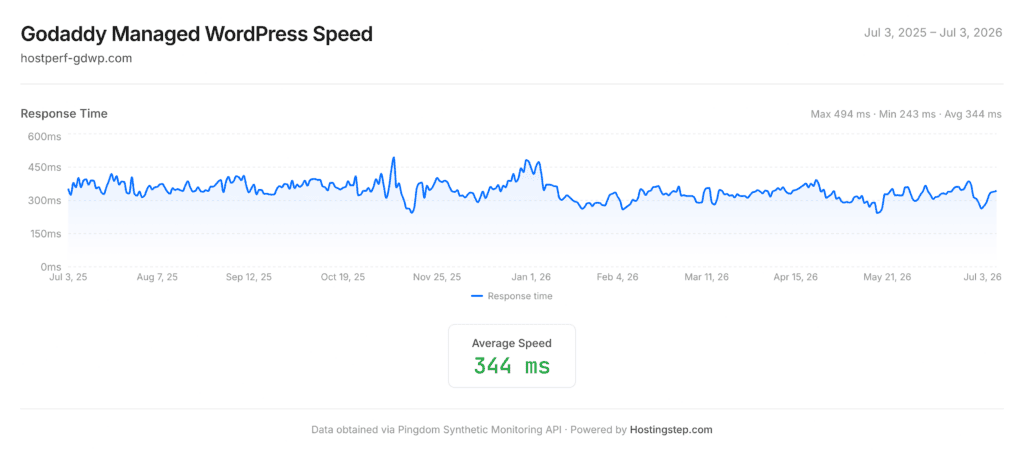
The minimum and maximum response times stayed inside a 243ms to 494ms band across the entire 365 days, with no sustained drift in either direction. That consistency matters more than the headline average: it means sites hosted on GoDaddy WordPress hosting serve visitors at a predictable speed rather than degrading as the year progresses.
Uptime
- Uptime: 99.99%
- Downtime: 37 minutes
- Outages: 5
- Setup: Ping every 60 seconds; 30-second threshold — anything over that counts as downtime
The uptime of GoDaddy WordPress hosting is 99.99%, which is within their guaranteed SLA of 99.9%. There are a total of 5 outages across 365 days, which is quite remarkable, given that we’ve been experiencing more outages on our GoDaddy web hosting plans. The total downtime lasted 37 minutes, which is again a reliable score.
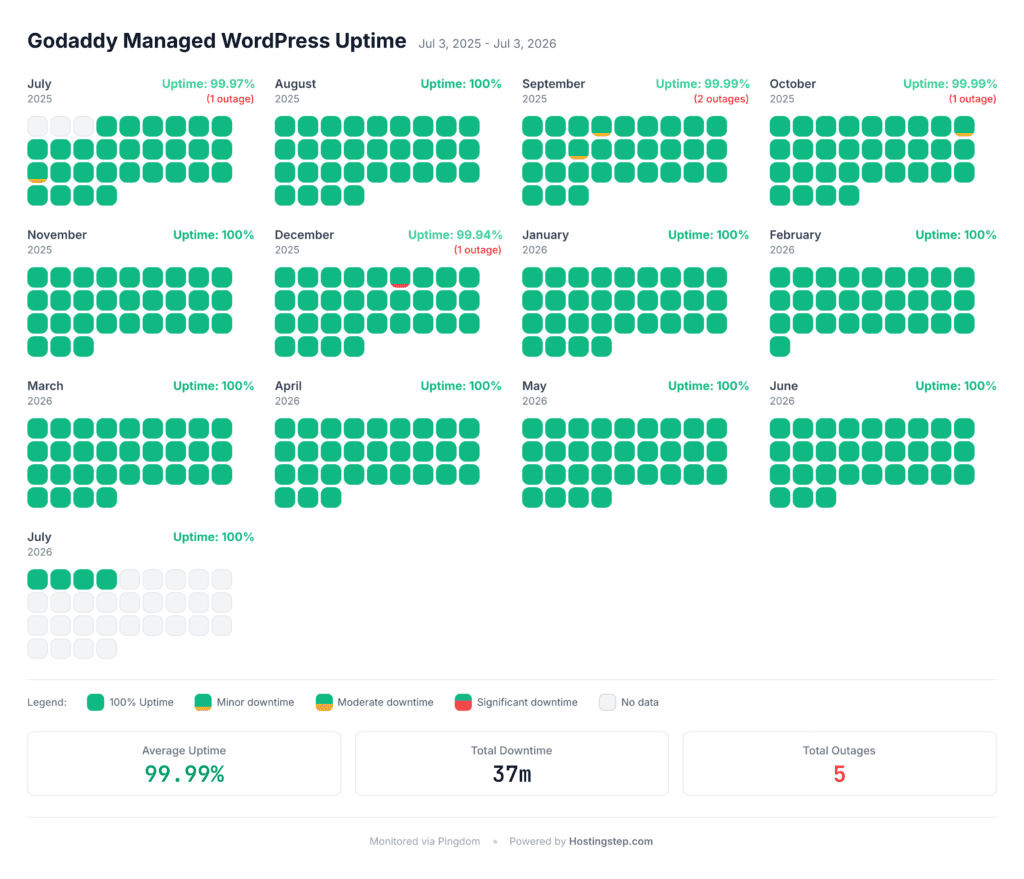
All five outages landed in the first half of the test window. The second half ran without a single recorded outage, which suggests the platform stabilised rather than degraded over the year.
Some concerns are that Pingdom records several “Unknown” statuses, which means it can’t detect whether there is downtime. In such cases, we use our secondary uptime monitoring data (FreshPing) to improve identification. So far, FreshPing hasn’t detected any downtime.
Load Handling
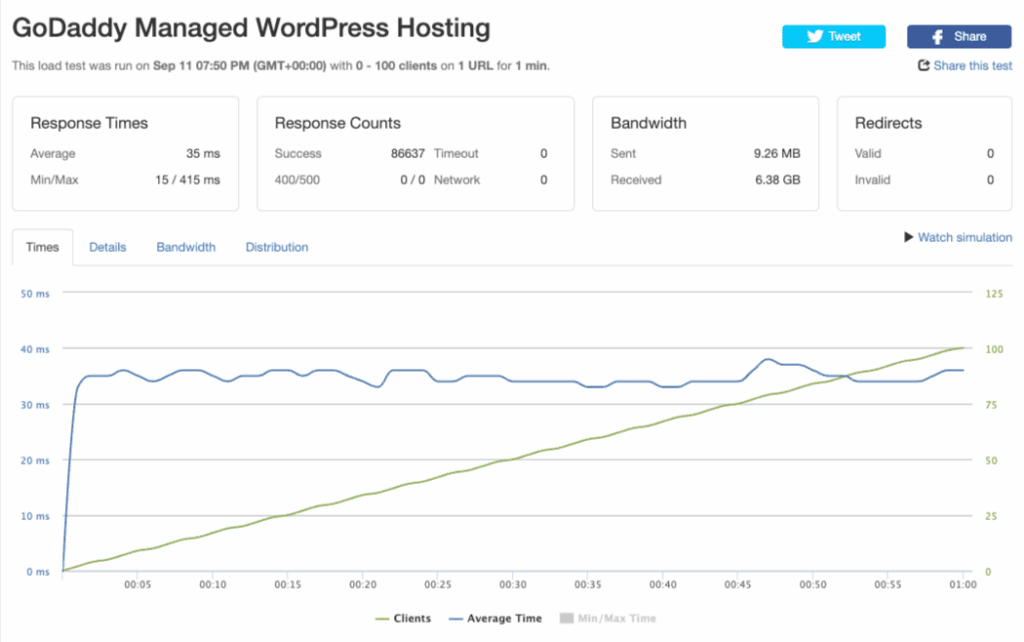
- Average response time: 35ms
- Min/Max response time: 15 / 415ms
- Successful responses: 86,637
- Timeouts: 0
- 400/500 errors: 0
- Network errors: 0
GoDaddy handled our load test exceptionally well at an average response time of 35ms. We started the test with 0 users, and it increased by 1 every second until it reached 100 users. The graph shows that as the load per second increased, the response time remained between 30ms and 40ms, with no uneven fluctuations in handling the load. The response counts are excellent, with no timeouts, 400s/500s, and network errors. It indicates it handled all our loads without any issues.
Global TTFB
- Cached global TTFB average: 75ms
- Europe average: 60ms (11 locations)
- Americas average: 62ms (13 locations)
- Asia Pacific average: 97ms (15 locations)
- Cache hit rate: 100%
We measure warm-cache TTFB from 40 global test locations using SpeedVitals. GoDaddy returned a 75ms average, and every single location came back under 300ms. Three continents sit within 37ms of each other, which is the signature of a properly configured edge cache: visitors are served from a nearby Cloudflare point of presence rather than being routed back to the US origin server.
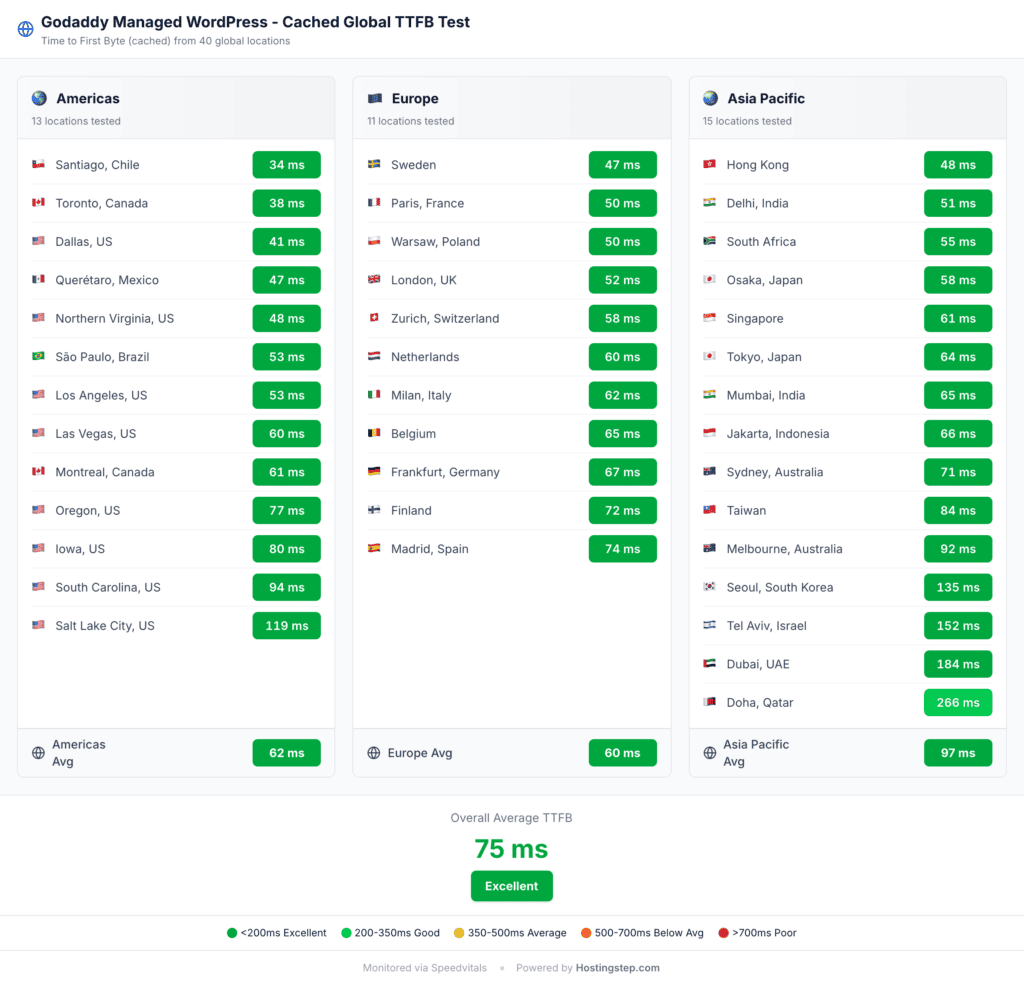
The Middle East is where the edge network thins out. Doha (266ms), Dubai (184ms) and Tel Aviv (152ms) are the three slowest results in the set, and Seoul (135ms) is the only East Asian outlier. Everywhere else in Asia Pacific returns under 100ms. If your audience sits primarily in the Gulf states, that gap is worth weighing; for every other market GoDaddy’s global delivery is competitive with hosts costing several times more.
Hardware Server Test
WPBenchmark measures the CPU, memory and disk resources a host allocates to your plan, independent of any caching layer. GoDaddy Managed WordPress scored 3.8 out of 10. The component results below explain where that number comes from.
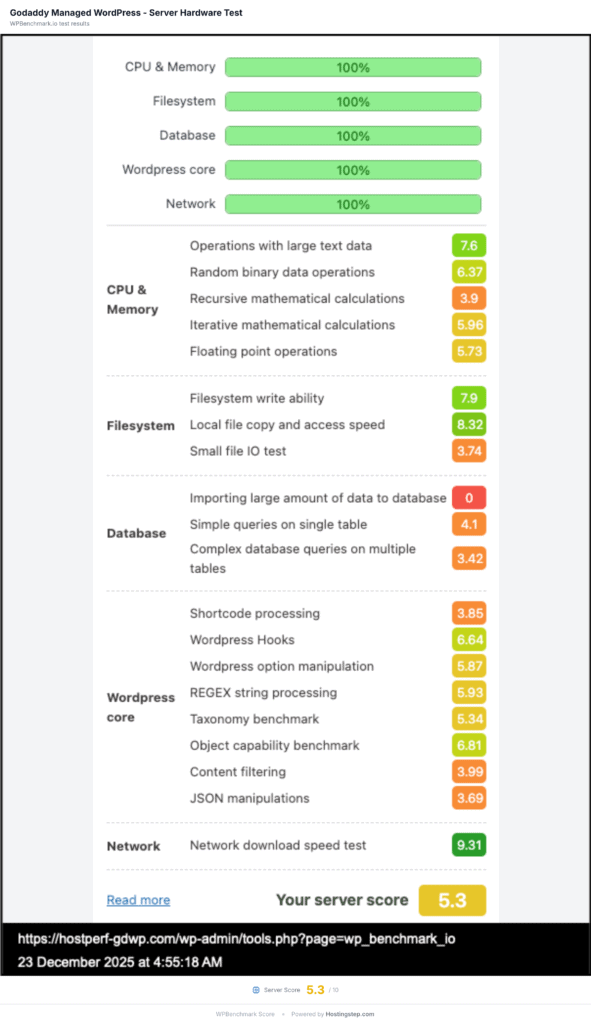
The one test where GoDaddy Managed WordPress fails terribly is its limited hardware score. The score is comparable to shared hosting providers but low for premium priced hosts.
GoDaddy vs other managed WordPress hosts
| Host | TTFB | Uptime | Outages | Load test | Global TTFB | WPBench |
|---|---|---|---|---|---|---|
| WordPress.com | 319ms | 100% | 0 | 16ms / 0% errors | 69ms | 6.8/10 |
| Pressable | 320ms | 100% | 0 | 12ms / 0% errors | 74ms | 6.7/10 |
| GoDaddy Managed WordPress | 344ms | 99.99% | 5 | 35ms / 0% errors | 75ms | 3.8/10 |
| Rocket.net | 346ms | 99.97% | 7 | Failed / 100% errors | 66ms | 7.5/10 |
| WP Engine | 355ms | 100% | 0 | 27ms / 0% errors | 65ms | 6.5/10 |
| Kinsta | 525ms | 99.98% | 4 | 40ms / 0% errors | 477ms | 8.8/10 |
GoDaddy sits third on response time and fourth on cached global TTFB in this group, and it is the cheapest plan on the list by a wide margin. It is also last on WPBench, scoring less than half of Kinsta’s 8.8. That single contrast is the whole story of this host: competitive delivery, constrained hardware.
Features
Websites allowed
- Basic: 1 website (add up to 99 more)
- Deluxe: 1 website (add up to 99 more)
- Ultimate: 3 websites (add up to 97 more)
GoDaddy Basic and Deluxe plans each offer one website. Ultimate offers 3 websites on its plans. You can also add more sites to any plan for $4.99/month. Let’s say you have a ~5GB site: you can pay $4.99/month and add it to your Basic Package. Likewise, storage space can be expanded without changing the plan. This is the first time I’ve seen GoDaddy offer so many upgrades within the plans, without trying to upsell to higher plans.
Storage
- Basic: 10GB NVMe storage
- Deluxe: 20GB NVMe storage
- Ultimate: 30GB NVMe storage
The storage space is in accordance with other managed hosting services, not much higher or lower. The interesting part is that GoDaddy offers additional storage across all plans, so you can stay on the same plan and pay a small fee to upgrade your storage. This, along with the site add-on, gives you the potential to host up to 100 sites and 200GB of storage on any plan. However, the WPBenchmark scores can be concerning due to limitations in its database operations.
Edge caching CDN
- Basic: No
- Deluxe & Ultimate: Yes
When we purchased our plan in June 2025, the Basic plan included CDN, but later, they removed it and made it exclusive to the GoDaddy Deluxe and Ultimate plans. Let me be honest, without CDN, there is nothing superior with a Basic plan. I don’t recommend it; you can choose any CDN-enabled edge caching plan.
Backups
- Basic: Weekly
- Deluxe: Daily
- Ultimate: Daily + on-demand backups
- Retention: 30 days
Backups are a straightforward process. It takes weekly or daily backups without issues and stores them for 30 days. It shows a calendar option, choose any date, and click to restore. There is nothing complicated here. GoDaddy provides the option to restore or download a backup and to view it. The backups feature is in a separate tab on their dashboard, which makes it harder to find. But once you know where the tab is located, it will be easier.
Staging sites
Staging is available on the Deluxe and Ultimate plans. The Basic plan does not include it, which is another reason we steer readers away from that tier.
What the Ultimate plan adds
The Ultimate plan carries a noticeably deeper developer feature set than Deluxe: Object Cache Pro, Git integration, Application Performance Monitoring, PHP version control, version control for WordPress core, a smart plugin manager, WooCommerce, and priority support.
Object Cache Pro is the one worth calling out. It is a commercial Redis object caching plugin that costs around $99/year on its own, and it directly targets the weakness our benchmark exposed. GoDaddy’s database scores of 4.41/10 on simple queries and 3.52/10 on complex multi-table queries are the plan’s weakest results. Object caching reduces how often WordPress needs to hit the database at all, which softens that bottleneck on dynamic and WooCommerce workloads. If you are running anything database-heavy on GoDaddy, Ultimate is the tier to pick, not Deluxe.
Other features
- SSL: Free on all plans
- SEO Optimizer and TrustedSite: Deluxe and Ultimate
Frequently Asked Questions
Do the plans come with free domain and email hosting?
No, GoDaddy doesn’t offer free email hosting with any of its managed WordPress hosting plans. You need to manually purchase email from GoDaddy or another reputable source, such as Google Workspace. You can get a free domain on annual plans.
Is there any traffic limit per plan?
GoDaddy doesn’t directly mention any traffic limits per plan.
GoDaddy claims to offer faster speeds than Flywheel, Bluehost, SiteGround, DreamHost, and Hostinger on its landing page. Is this true?
Our data supports the claim on response time. GoDaddy’s managed WordPress plans include an edge caching CDN, and our historical benchmark data shows that hosts with edge caching consistently outperform those without it. Of the hosts GoDaddy names, only Flywheel ships comparable edge caching by default, which is why GoDaddy leads the rest of that list on TTFB.
How good is Airo Plus Site Optimizer?
GoDaddy offers a limited version of Airo Plus Site Optimizer, and we are not sure what it does. Initially, we thought it was a NitroPack-like speed optimizer tool, but it is more likely a marketing tool to fix SEO issues.
Is GoDaddy Managed WordPress the same as GoDaddy shared hosting?
No. They run on separate infrastructure and perform very differently. Our managed WordPress test site averaged 344ms, while our GoDaddy shared hosting test site averaged 734ms over the same period. Anyone comparing GoDaddy on price alone should be clear about which product they are buying.
How We Test GoDaddy WordPress Hosting
Independent, transparent, and continuous performance monitoring.
Our testing approach
- Independent testing: We purchased GoDaddy hosting with our own money on June 30, 2025. GoDaddy doesn’t know we’re testing them.
- Test duration: Continuous monitoring from July 3, 2025 to July 3, 2026 — a full year of real-world data across 525,600 checks.
- Monitoring status: This test concluded on July 3, 2026. The figures on this page are final and will not change unless we purchase a new plan and restart monitoring.
Test site setup
- WordPress (latest version)
- Twenty Twenty-Four theme
- PHP 8.3
- Server-side caching enabled
- Rank Math SEO plugin
- Contact Form 7
- Identical setup across all providers
5 core performance tests
1. TTFB (Time To First Byte) monitoring
What we measure: How fast GoDaddy’s server responds to requests.
- Testing tool: Pingdom synthetic monitoring
- Test frequency: Every 60 seconds, 24/7/365
- Test locations: 22 U.S. regions simultaneously
- Data points collected: 525,600 TTFB measurements across the test year
Why it matters: TTFB directly impacts your site’s loading speed and SEO rankings. Faster TTFB means better user experience and higher search engine rankings.
2. Uptime reliability tracking
What we measure: How often GoDaddy’s servers stay online and accessible.
- Testing tool: Pingdom uptime monitoring
- Test frequency: Every 60 seconds, continuous
- Data collected: Total uptime percentage, number of outages, duration of each downtime incident, and time of day when outages occur
Industry standard: 99.9% uptime is considered acceptable; 99.99% is excellent; 100% is rare but ideal.
3. Load testing (traffic spike performance)
What we measure: How GoDaddy handles sudden traffic increases and concurrent visitors.
- Testing tool: Loader.io
- Ramp: 0 to 100 concurrent users over 60 seconds
- Data tracked: Average response time under load, error rates (4xx/5xx), peak capacity, and server stability during stress
Why it matters: Shows if your site can handle viral posts, sale events, marketing campaigns, or sudden traffic spikes without slowing down or crashing.
4. Global TTFB testing
What we measure: Warm-cache server response times from worldwide locations to test international performance.
- Testing tool: SpeedVitals
- Test locations: 40 cities across 6 continents
Why it matters: Critical if you have international visitors or plan to expand globally. Shows how fast your site loads for users around the world.
5. WPBenchmark server performance
What we measure: The CPU, memory and disk resources the host allocates to the plan.
- Testing tool: WPBenchmark plugin
- Score range: 0–10 (10 = best)
- Areas tested: CPU processing, memory handling, filesystem read/write, and database query execution
Why it matters: WPBenchmark bypasses caching entirely, so it shows what the server can do when a request cannot be served from cache. Better allocated resources mean a faster WordPress backend, quicker plugin operations and faster database queries.
Why our testing is different
- Real money invested: We pay for hosting like you would — no sponsorships
- Long-term monitoring: A full year of continuous data, not just weekend tests
- Standardized environment: Same WordPress setup for every host = fair comparisons
- Multiple test types: We don’t rely on just one metric for accuracy
- No bias: Testing happens before reviewing; results speak for themselves
- Transparent methodology: You know exactly how we test and why
Testing transparency
What we share: Raw performance numbers with no rounding or manipulation, actual uptime percentages with downtime details, real outage data including frequency and duration, and honest assessments based on objective data.
What you should know: These results cover a specific test period of July 3, 2025 to July 3, 2026, and monitoring has now concluded. Your experience may vary based on your specific plan and configuration. Some features were assessed on higher-tier plans where noted. GoDaddy’s performance may change after our test window closed.
Questions about our testing? Visit our complete methodology documentation at hostingstep.com/methodology. All testing conducted independently by Hostingstep. Our commitment: data first, let people choose what they want.
Changelog
- July 21, 2026: Final update with a complete year of data (July 3, 2025 – July 3, 2026, 525,600 TTFB checks). Average response time 344ms, uptime 99.99% across 5 outages and 37 minutes of downtime. Cached global TTFB re-measured at 75ms from 40 locations. WPBenchmark re-run scored 3.8/10, prompting a revised verdict on server resource allocation. Pricing and plan features updated. Monitoring has concluded and these figures are final.
- November 4, 2025: Initial version of GoDaddy Managed WordPress hosting review is published. We bought the plan on June 30, 2025 and started monitoring from July 3, 2025. The initial review was published with 4 months of data.